IT Support Specialist Resume Certifications

Hiring managers want proof you aren’t just good with Google. Relevant IT certifications slap a golden star on your resume faster than you can say “troubleshoot.” This article will show you why those badges matter and how to pick the ones that’ll upgrade your job hunt from dial-up to fiber optic.
Why Earning Certifications Is Key for IT Support Specialist Success
Certifications are like a badge of honor for IT Support Specialists—proof that they’ve tackled complex concepts and come out on top. Employers see those credentials and immediately know a candidate has met a certain standard, not just in theory but in hands-on, practical skills. On a crowded resume stack, certifications can make someone’s name leap out, hinting at a willingness to go the extra mile. In short, they aren’t just pieces of paper; they’re signals of trust and capability in a fiercely competitive field.
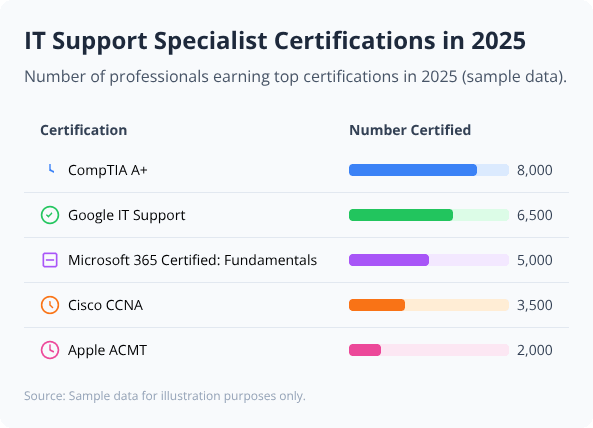
Adding a certifications section to your resume can really boost your chances, especially in IT support where proven skills and credentials matter.
Best Certifications to Add to Your IT Support Specialist Resume
- CompTIA A+: A foundational credential that signals solid, hands-on know-how with hardware, software, and troubleshooting—often the baseline employers expect.
- Microsoft Certified: Modern Desktop Administrator Associate: Demonstrates sharp skills in deploying, managing, and securing modern Windows desktops, a must for many corporate environments.
- Google IT Support Professional Certificate: Designed for beginners, this certificate cuts straight to the essentials and gives practical, real-world troubleshooting experience.
- CompTIA Network+: Highlights a strong grasp of networking basics, making it easier to handle connectivity hiccups and more complex IT infrastructure tasks.
- HDI Support Center Analyst (HDI-SCA): Focuses on customer service strategy blended with tech support expertise, helping IT pros deliver top-tier support experiences.
- Apple Certified Support Professional (ACSP): Offers proof that you can tame Mac systems and master Apple’s operating environments, opening doors in Apple-heavy workplaces.
- ITIL Foundation Certification: Lays down a solid framework for understanding IT service management processes—a hidden advantage when systems chaos needs reigning in.
DO'S
- List relevant certifications near the top of your resume to grab attention quickly.
- Include the full certification name, issuing organization, and date earned.
- Highlight certifications that match the job’s requirements or desired skills.
DON'TS
- Don't list expired or irrelevant certifications that clutter your skills section.
- Don't use unofficial abbreviations—always spell out certifications completely.
- Don't exaggerate or claim certifications you haven’t actually earned.
Pro Tip: Crowded inboxes, scanning eyes—hiring managers don’t have time to play “Where’s Waldo?” with your credentials; put your sharpest, most relevant certifications front and center so your resume shouts, “I’m exactly what you need.”